Mandatory thermostat by 2030, smart radiators, Zigbee protocol… Looking to take back control of your heating without relying on the cloud? Here's a ready-to-use Home Assistant blueprint for the Bosch BTH-RM thermostat — plus the pitfalls nobody documents.
Looking to integrate the Bosch Room Thermostat II (RBSH-RTH0-BAT-ZB-EU) into Home Assistant to control a smart radiator? After several weeks of testing and iterations, I'm sharing my complete YAML blueprint, ready to use, along with explanations of the pitfalls I encountered.
Mandatory thermostat in France: what the law says
Before diving into the technical side, an important regulatory reminder. Decree No. 2023-444 of 7 June 2023 mandates the installation of a programmable thermostat in all homes in France. The deadlines were adjusted at the end of 2025 by Decree No. 2025-1343:
- New buildings: mandatory from 1 January 2027 (for building permits filed from that date)
- Existing homes: deadline extended to 1 January 2030
- Since 2018: already mandatory when replacing a boiler
The thermostat must support at least four programming levels: comfort, reduced, frost protection and off, with room-by-room or zone-based regulation. Good news: the law doesn't require a smart thermostat — a simple programmable one is enough. But if you're investing in hardware, you might as well make it do more than tick a regulatory box.
According to ADEME, a programmable thermostat can save up to 15% on heating bills. A smart thermostat can go further thanks to intelligent adaptation to living habits.
On the funding side, grants are available: the "Coup de pouce chauffage" subsidy can cover part of the installation. Homeowners are responsible for the equipment, tenants for maintenance. An exemption is provided if the return on investment exceeds 10 years.
The approach I present in this article goes well beyond the legal requirement: a Bosch Zigbee thermostat paired with Home Assistant offers room-by-room regulation, advanced scheduling and zero cloud dependency — your data stays home, your heating works even if the Internet goes down.
Why choose the Bosch BTH-RM Zigbee thermostat?
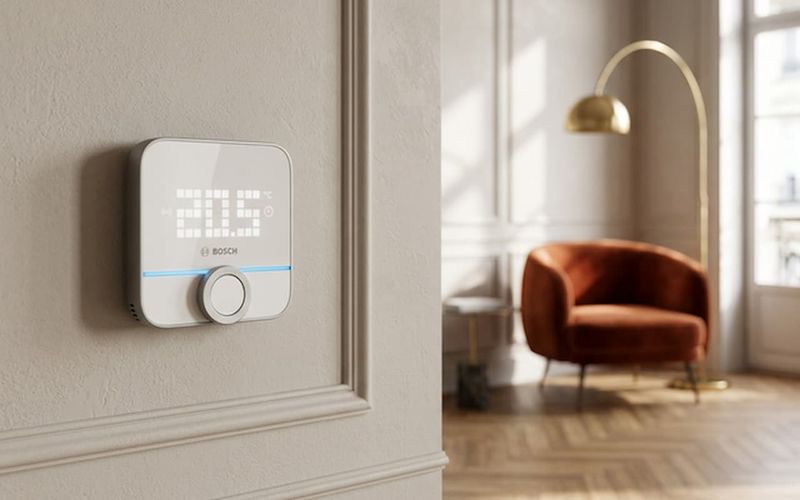
The Bosch Room Thermostat II is a battery-powered Zigbee 3.0 thermostat. Unlike Wi-Fi solutions that saturate your home network and depend on the manufacturer's cloud, it communicates locally — no data leaves your home. Temperature and humidity sensor, readable LED display with rotary dial, approximately one year of battery life on AA batteries.
Compact (86 × 87 × 28 mm, 85 g), it blends discreetly into any room. Its main appeal for Home Assistant users: it can serve as a physical remote to control a connected electric radiator — via a climate entity in Home Assistant (generic thermostat, pilot wire module, Intuis radiator…).
Prerequisites: hardware and software
Before getting started, make sure you have:
- Home Assistant installed and running
- Zigbee2MQTT configured with a Zigbee coordinator (Sonoff ZBDongle-P, Conbee II, etc.)
- A smart radiator controlled via a
climateentity in Home Assistant (generic thermostat, pilot wire module, Intuis radiator, etc.) - The Bosch BTH-RM thermostat paired to your Zigbee network
Pairing the Bosch BTH-RM with Zigbee2MQTT
Pairing is straightforward but worth a few notes. The Zigbee2MQTT documentation for the BTH-RM details the full procedure.
- Enable pairing mode in Zigbee2MQTT ("Allow connection" button or
permit_join: true) - On the Bosch thermostat, press and hold the + and - buttons simultaneously for 3 to 5 seconds
- The Zigbee symbol flashes on the screen: the thermostat is searching for the network
- Zigbee2MQTT detects the device as Bosch BTH-RM
Once paired, the thermostat exposes several entities in Home Assistant, including the climate entity we're interested in.
The Bosch quirk: temperature range mode
This is the first pitfall I encountered. Unlike most Zigbee thermostats that expose a simple temperature attribute for the setpoint, the Bosch uses a range mode with two attributes:
target_temp_low: low setpoint (e.g. 21°C)target_temp_high: high setpoint (e.g. 23°C)
This is confirmed by the supported_features: 386 attribute, indicating TARGET_TEMPERATURE_RANGE support rather than simple TARGET_TEMPERATURE. The climate entity documentation in Home Assistant explains these different modes.
In practice, when you turn the dial on the thermostat, it's target_temp_low that changes and represents your heating setpoint. This is the value you need to listen to in your automations.
On the MQTT side, the setpoint is called occupied_heating_setpoint and expects a value in degrees (not centidegrees). Here's a typical MQTT payload:
{
  "local_temperature": 22.3,
  "occupied_heating_setpoint": 21,
  "occupied_cooling_setpoint": 23,
  "system_mode": "heat",
  "operating_mode": "manual",
  "humidity": 47.6,
  "setpoint_change_source": "manual",
  "battery": 90
}
Home Assistant Blueprint: bidirectional thermostat-radiator synchronisation
This blueprint provides bidirectional synchronisation between the Bosch thermostat and a generic Home Assistant thermostat controlling your radiator:
- When you change the temperature on the Bosch → the radiator follows
- When an automation modifies the target thermostat → the Bosch display updates
- When you turn one off or on → the other follows
Installation
Quick method: click the button below to import the blueprint directly into your Home Assistant:

Manual method:
- Download the YAML file from the GitHub repository
- Copy it to your
config/blueprints/automation/custom/folder - Reload automations in Home Assistant
- Create a new automation based on this blueprint
- Select your Bosch thermostat, enter its Zigbee2MQTT name, and choose your target thermostat
The YAML code
blueprint:
  name: Bosch BTH-RM - Thermostat Control V5
  description: |
    Bidirectional thermostat control with Bosch Room Thermostat II (BTH-RM)

    Features:
    - Bidirectional temperature setpoint synchronisation
    - ON/OFF state synchronisation
    - Automatic manual mode on startup

    Note: The Bosch uses target_temp_low/high (range mode)

  domain: automation
  input:
    bosch_climate:
      name: Bosch BTH-RM Thermostat
      description: The climate entity of the Bosch Room Thermostat II
      selector:
        entity:
          filter:
            domain: climate

    bosch_z2m_name:
      name: Zigbee2MQTT Bosch Name
      description: "The exact device name in Zigbee2MQTT (e.g.: bedroom_climate_control)"
      selector:
        text:

    target_thermostat:
      name: Target Thermostat to Control
      description: The climate entity (generic thermostat) to control with the Bosch
      selector:
        entity:
          filter:
            domain: climate

    temp_min:
      name: Minimum Temperature
      description: Minimum allowed temperature
      default: 5
      selector:
        number:
          min: 4
          max: 15
          step: 0.5
          unit_of_measurement: "°C"

    temp_max:
      name: Maximum Temperature
      description: Maximum allowed temperature
      default: 30
      selector:
        number:
          min: 20
          max: 35
          step: 0.5
          unit_of_measurement: "°C"

mode: queued
max_exceeded: silent
max: 5

trigger:
  # Initialisation on Home Assistant start
  - platform: homeassistant
    event: start
    id: initialization

  # Any change on the Bosch
  - platform: state
    entity_id: !input bosch_climate
    id: bosch_change

  # Any change on the target thermostat
  - platform: state
    entity_id: !input target_thermostat
    id: target_change

condition:
  # Ignore unavailable/unknown states
  - condition: template
    value_template: >
      {{ trigger.id == 'initialization' or
         (trigger.to_state.state not in ['unavailable', 'unknown'] and
          trigger.from_state.state not in ['unavailable', 'unknown']) }}

action:
  - variables:
      bosch_entity: !input bosch_climate
      bosch_name: !input bosch_z2m_name
      target_entity: !input target_thermostat
      min_temp: !input temp_min
      max_temp: !input temp_max

  - choose:
      # ==========================================
      # INITIALISATION ON STARTUP
      # ==========================================
      - conditions:
          - condition: trigger
            id: initialization
        sequence:
          - delay:
              seconds: 10

          # Set Bosch to manual mode
          - service: mqtt.publish
            data:
              topic: "zigbee2mqtt/{{ bosch_name }}/set"
              payload: '{"operating_mode": "manual"}'

          - delay:
              milliseconds: 500

          # Sync from target thermostat to Bosch
          - variables:
              init_temp: "{{ state_attr(target_entity, 'temperature') | float(20) }}"
              init_state: "{{ states(target_entity) }}"
              init_mode: "{{ 'off' if init_state == 'off' else 'heat' }}"

          - service: mqtt.publish
            data:
              topic: "zigbee2mqtt/{{ bosch_name }}/set"
              payload: >
                {"occupied_heating_setpoint": {{ init_temp }}, "system_mode": "{{ init_mode }}"}

      # ==========================================
      # BOSCH CHANGE → TARGET
      # ==========================================
      - conditions:
          - condition: trigger
            id: bosch_change
        sequence:
          - variables:
              # The Bosch uses target_temp_low for heating
              bosch_temp: "{{ state_attr(bosch_entity, 'target_temp_low') | float(0) }}"
              bosch_state: "{{ states(bosch_entity) }}"
              target_temp: "{{ state_attr(target_entity, 'temperature') | float(0) }}"
              target_state: "{{ states(target_entity) }}"
              old_bosch_temp: "{{ trigger.from_state.attributes.target_temp_low | default(0) | float(0) }}"
              old_bosch_state: "{{ trigger.from_state.state }}"

          # Sync temperature if changed on Bosch
          - choose:
              - conditions:
                  - "{{ bosch_temp > 0 }}"
                  - "{{ bosch_temp != old_bosch_temp }}"
                  - "{{ (bosch_temp - target_temp) | abs > 0.1 }}"
                sequence:
                  - service: climate.set_temperature
                    target:
                      entity_id: "{{ target_entity }}"
                    data:
                      temperature: "{{ [[bosch_temp, min_temp] | max, max_temp] | min }}"

          # Sync ON/OFF state if changed on Bosch
          - choose:
              - conditions:
                  - "{{ bosch_state != old_bosch_state }}"
                  - "{{ bosch_state == 'off' and target_state != 'off' }}"
                sequence:
                  - service: climate.turn_off
                    target:
                      entity_id: "{{ target_entity }}"

              - conditions:
                  - "{{ bosch_state != old_bosch_state }}"
                  - "{{ bosch_state != 'off' and target_state == 'off' }}"
                sequence:
                  - service: climate.set_hvac_mode
                    target:
                      entity_id: "{{ target_entity }}"
                    data:
                      hvac_mode: heat

      # ==========================================
      # TARGET CHANGE → BOSCH
      # ==========================================
      - conditions:
          - condition: trigger
            id: target_change
        sequence:
          - variables:
              bosch_temp: "{{ state_attr(bosch_entity, 'target_temp_low') | float(0) }}"
              bosch_state: "{{ states(bosch_entity) }}"
              target_temp: "{{ state_attr(target_entity, 'temperature') | float(0) }}"
              target_state: "{{ states(target_entity) }}"
              old_target_temp: "{{ trigger.from_state.attributes.temperature | default(0) | float(0) }}"
              old_target_state: "{{ trigger.from_state.state }}"

          # Sync temperature if changed on target
          - choose:
              - conditions:
                  - "{{ target_temp > 0 }}"
                  - "{{ target_temp != old_target_temp }}"
                  - "{{ (target_temp - bosch_temp) | abs > 0.1 }}"
                sequence:
                  - service: mqtt.publish
                    data:
                      topic: "zigbee2mqtt/{{ bosch_name }}/set"
                      payload: '{"occupied_heating_setpoint": {{ target_temp }}}'

          # Sync ON/OFF state if changed on target
          - choose:
              - conditions:
                  - "{{ target_state != old_target_state }}"
                  - "{{ target_state == 'off' and bosch_state != 'off' }}"
                sequence:
                  - service: mqtt.publish
                    data:
                      topic: "zigbee2mqtt/{{ bosch_name }}/set"
                      payload: '{"system_mode": "off"}'

              - conditions:
                  - "{{ target_state != old_target_state }}"
                  - "{{ target_state != 'off' and bosch_state == 'off' }}"
                sequence:
                  - service: mqtt.publish
                    data:
                      topic: "zigbee2mqtt/{{ bosch_name }}/set"
                      payload: '{"system_mode": "heat"}'
Technical design choices explained
A few points worth detailing for those who want to adapt this blueprint.
Why mode: queued and max: 5? The Bosch can send multiple rapid MQTT updates when you turn the dial. Queued mode ensures each change is processed in order, without losing any. The max: 5 prevents excessive build-up if the Zigbee network slows down.
Why target_temp_low and not temperature? As explained above, the Bosch exposes supported_features: 386, indicating range mode. The classic temperature attribute doesn't exist on this entity. It's target_temp_low that carries the heating setpoint. The climate entity documentation details the supported_features calculation.
Why publish via MQTT rather than use climate.set_temperature? The Bosch in range mode expects set_temperature with both target_temp_low AND target_temp_high. Going through MQTT with occupied_heating_setpoint is more direct and reliable for modifying only the heating setpoint.
Why compare trigger.from_state instead of using a simple threshold? This is the main anti-loop mechanism. Instead of adding a 500ms delay and hoping the state has stabilised, we directly compare the old state (trigger.from_state.attributes.target_temp_low) with the new one. If the value hasn't actually changed on the trigger source entity, we do nothing. This eliminates synchronisation loops deterministically rather than temporally.
Why a clamp [[val, min] | max, max] | min instead of >= / <= conditions? With conditions, an out-of-range value is simply ignored — the user turns the dial and nothing happens, with no feedback. With a clamp, the value is brought within the allowed range: if the user requests 35°C and the max is 30°C, the radiator receives 30°C. The behaviour is predictable and transparent.
Why climate.set_hvac_mode: heat instead of climate.turn_on? turn_on restores the last HVAC mode used, which could be cool or auto depending on the target entity. set_hvac_mode: heat is explicit and ensures the radiator switches to heating mode, not cooling.
Why a single combined MQTT payload on initialisation? On startup, the old version sent the setpoint and ON/OFF state in two separate MQTT commands with a 2-second delay between them. The current version combines both in a single payload {"occupied_heating_setpoint": X, "system_mode": "heat"}. It's faster and avoids a transient state where the thermostat might have the right setpoint but the wrong state (or vice versa).
Pitfalls to avoid with the Bosch BTH-RM thermostat
I lost an entire weekend on these issues. Here's how to avoid them.
The supported_features: 386 — If you copy a blueprint designed for a standard thermostat (Tuya, Aqara…), it won't work with the Bosch. Most community blueprints listen to the temperature attribute, which doesn't exist on the BTH-RM. Always check your climate entity's attributes in Developer Tools → States.
The operating_mode — The Bosch sometimes starts in schedule mode (internal programming). In this mode, it ignores setpoints sent by Home Assistant and follows its own schedule. The blueprint forces a switch to manual mode on HA startup to avoid this issue.
The setpoint_change_source detection — The Bosch's MQTT payload includes a setpoint_change_source field that reads manual when the user turns the dial, and externally when the setpoint comes from outside (via MQTT). This is useful for debugging if you observe synchronisation loops. The blueprint uses a more robust approach: comparing trigger.from_state vs current state, which detects whether the value has actually changed on the trigger source entity.
The Delivery failed on ZCL commands — If you see this error in the Zigbee2MQTT logs, it's often because the Bosch is a battery-powered device that sleeps between transmissions. Make sure your Zigbee mesh is solid (add routers nearby). The dedicated thread on the Home Assistant forum documents these cases well.
My complete heating home automation setup
For context, here's my complete setup using this blueprint:
| Room | Thermostat (control) | Radiator (heating) |
|---|---|---|
| Bedroom | Bosch BTH-RM (Zigbee) | Intuis (Zigbee) |
| Living room | Aqara W100 (Zigbee) | NodOn pilot wire (Zigbee) |
| Other rooms | Aqara W100 (Zigbee) | Intuis (Zigbee) |
The blueprint presented here manages the bedroom. For the Aqara W100, I use a different blueprint adapted to their specific requirements (proprietary MQTT topics, PMTSD handling). If you're interested, let me know on LinkedIn — I'll prioritize it if there's demand.
Conclusion: going further
This blueprint gives you locally controlled, bidirectionally synced heating with no cloud. To go further, here's what I'm exploring:
- Time-based scheduling with Schedy (AppDaemon): set different temperature ranges for weekdays/weekends, with overrides for remote work or guests
- Open window detection: automatically turn off heating when the Bosch detects a rapid temperature drop (the
window_detectionis exposed in Zigbee2MQTT attributes) - Dedicated dashboard: a Lovelace card showing the current temperature, setpoint, humidity and battery level of the Bosch
Note: the Bosch BTH-RM also supports cooling mode (cool) via occupied_cooling_setpoint and target_temp_high. This blueprint is designed for heating (heat / off) — the most common use case. If you have a reversible air conditioner and want to extend the blueprint, the GitHub repository is open to contributions.
With the obligation to install a programmable thermostat by 2030, now is a good time to invest in a long-lasting home automation solution. The blueprint source code is available on GitHub — issues and pull requests are welcome. Got a question about the blueprint or the Bosch integration? Let's talk.
Sources
- Bosch Room Thermostat II — zigbee2mqtt.io
- Home Assistant — home-assistant.io
- Decree No. 2023-444 of 7 June 2023 — service-public.gouv.fr
- adjusted at the end of 2025 — legrand.fr
- ADEME — agirpourlatransition.ademe.fr
- depend on the manufacturer's cloud — forumdomotique.com
- Zigbee2MQTT — zigbee2mqtt.io
- entity — home-assistant.io
- climate entity documentation — developers.home-assistant.io
- MQTT — home-assistant.io
- blueprint — home-assistant.io
- import the blueprint directly — home-assistant.io
- GitHub repository — github.com
- MQTT — home-assistant.io
- community blueprints — community.home-assistant.io
- Developer Tools → States — home-assistant.io
- Zigbee2MQTT — zigbee2mqtt.io
- Zigbee mesh — zigbee2mqtt.io
- dedicated thread on the Home Assistant forum — community.home-assistant.io
- LinkedIn — linkedin.com
- my.home-assistant.io — my.home-assistant.io